16 minute read
The OSI model and the TCP/IP model, explained
On this page
Overview
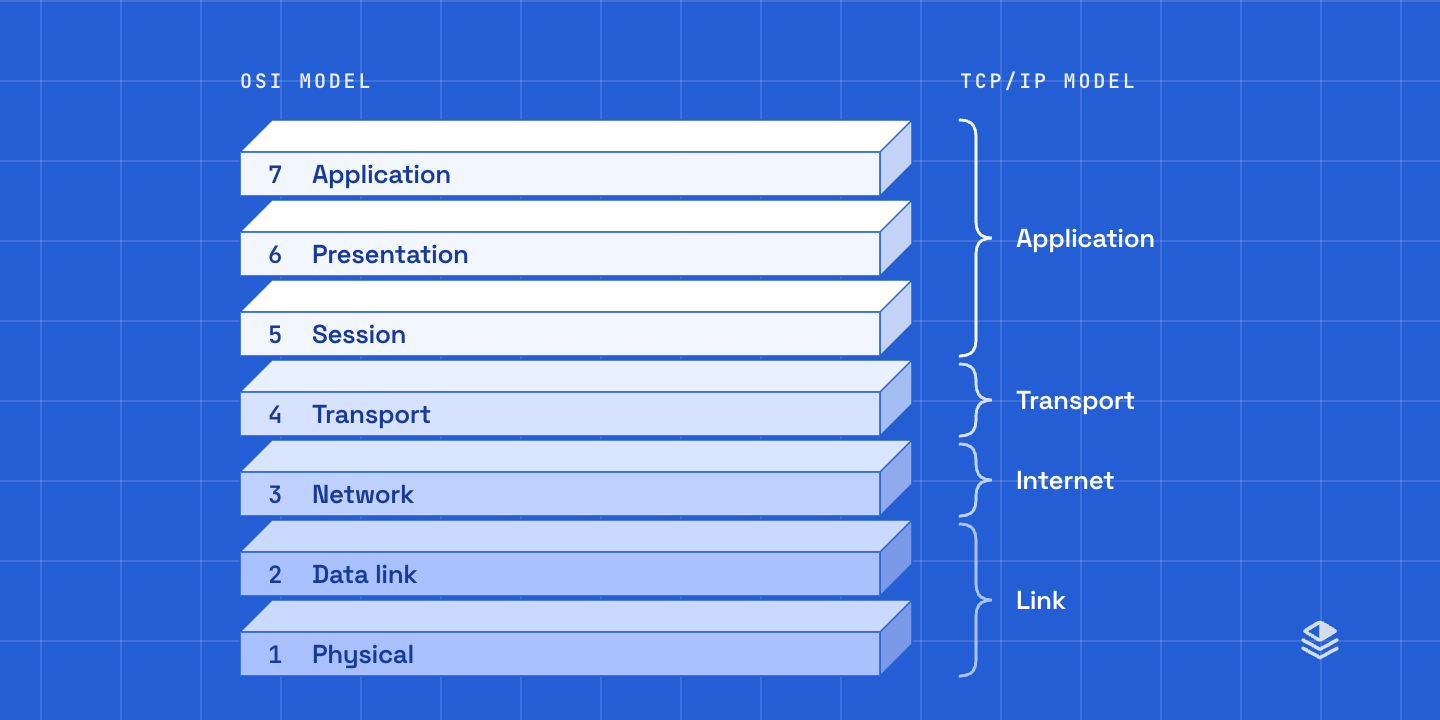
The OSI model is the vocabulary of network engineering. When one engineer tells another "that's a layer 2 problem," both know where to look. This article covers what the seven layers are, which protocols live at each, how the model maps onto the four-layer TCP/IP model the internet actually runs on, and how to use the layers to find a fault.
Common causes of network issues
1. DNS
“Before you do anything, check DNS. It's always DNS.”
In our experience more tickets end at DNS than at any other single cause, and it looks like a total outage: everything below is working and the client still can't turn a name into an address.
If the address answers and the name doesn't, stop looking at cables and routes. The fault is the resolver, the forwarder it uses, the DHCP option that handed it out, or a filter eating the reply.
nslookup unifiedit.tech # resolves? who answered?ping 1.1.1.1 # path up, by address?ping cloudflare.com # same path, by name?ipconfig /flushdns # drop a stale answerdig unifiedit.tech +short # resolves? to what?ping -c 3 1.1.1.1 # path up, by address?ping -c 3 cloudflare.com # same path, by name?sudo killall -HUP mDNSResponder # drop a stale answerdig unifiedit.tech +short # resolves? to what?ping -c 3 1.1.1.1 # path up, by address?ping -c 3 cloudflare.com # same path, by name?resolvectl status # which resolver is in useresolvectl flush-caches # drop a stale answerAfter DNS, the usual suspects, each with the layer it lives at:
- DHCP. No lease, or a lease from the wrong server: the client has a 169.254 address or the wrong gateway. Layer 7, but it travels by broadcast, so it's confined to one VLAN unless a relay carries it.
- The wrong VLAN or a dead port. No link light, a port negotiated down to 100 Mb/s, or a port tagged for the wrong network. Layers 1 and 2.
- Gateway, mask or route. The client reaches its own subnet and nothing else. Layer 3.
- A firewall rule. Everything resolves, everything pings, one application fails. Layer 4.
The OSI model
The Open Systems Interconnection (OSI) model is a reference model that divides network communication into seven layers, each with a defined job. The International Organization for Standardization published it as ISO 7498 in 1984; today it is ISO/IEC 7498-1, and the ITU-T publishes the same text as X.200. Each layer serves the layer above it, rides on the layer below, and talks only to its peer on the other machine.
It is a model, not a protocol: nothing on your network runs OSI. Its value is vocabulary, and product names borrow it: a layer 3 switch, a layer 4 load balancer, a layer 7 firewall.
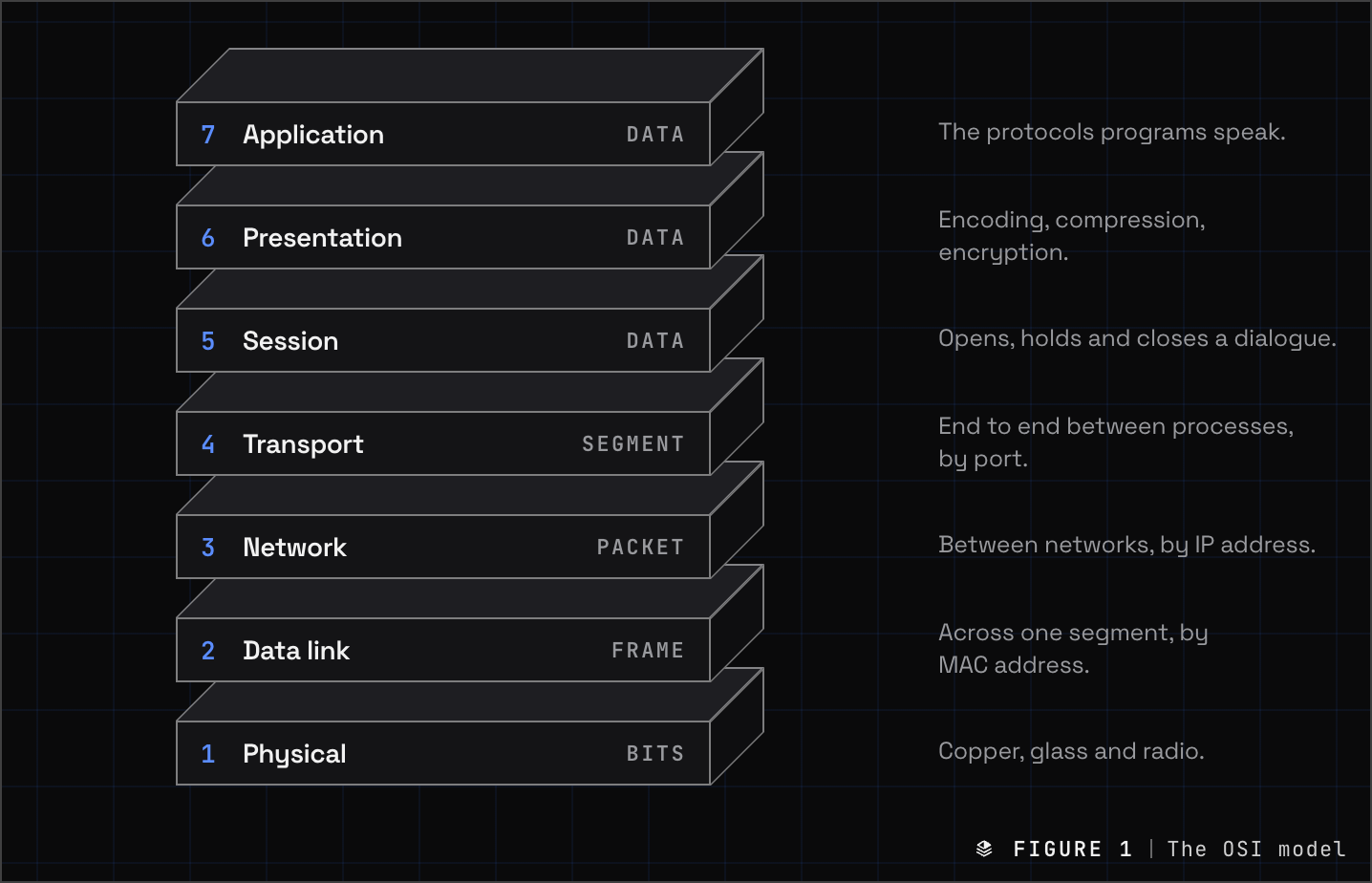
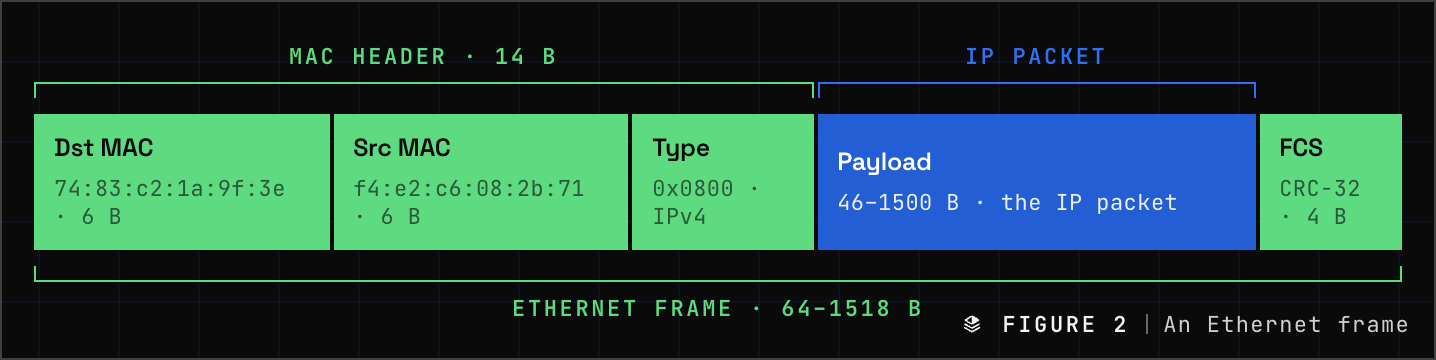
The wrapping is called encapsulation. The application hands its data to the transport layer, which puts a TCP or UDP header in front of it: a segment (TCP) or a datagram (UDP). The network layer puts an IP header in front of that: a packet. The data link layer adds an Ethernet header in front and a frame check sequence behind: a frame. The physical layer turns the frame into bits. The receiver peels each header off in reverse, and each layer reads only its own.
The seven layers, bottom up, because that is the order you troubleshoot in: a cable that is not plugged in explains every symptom above it.
Layer 1 — Physical
Moves bits across a medium: copper, glass or air. The physical layer defines connectors, pinouts, voltages, light wavelengths, radio channels and bit timing. Cables, patch panels, transceivers, media converters and repeaters are layer 1 devices. The unit is the bit.
- Cat6100 m
- OM4multimode
- OS2single-mode
- SFP+10G optic
- 802.3Ethernet PHY
- 802.11radio
- PoE802.3bt


How it fails: no link light, a port flapping, a link negotiating at 100 Mb/s instead of 1 Gb/s, a kinked fiber, a cheap patch cord, a PoE budget that is already spent. First check: the port's status and negotiated speed on the switch, its CRC and error counters, the optic's receive power, and then swap the cable.
Layer 2 — Data link
Delivers frames between devices on the same network segment, addressed by MAC address. Switches, bridges and access points are layer 2 devices. ARP sits on the boundary between layers 2 and 3: it is how a host finds the MAC address behind an IP address. The unit is the frame.
- Ethernet802.3
- Wi-Fi802.11
- VLAN802.1Q
- STP802.1D
- RSTP802.1w
- LACP802.1AX
- ARPRFC 826
- MAC48-bit

How it fails: a port in the wrong VLAN, a native VLAN mismatch on a trunk, a spanning-tree loop that takes a building down, a MAC address flapping between two ports, an SSID mapped to the wrong VLAN, a client with no DHCP lease because no DHCP server or relay is on its VLAN. First check: the port's VLAN membership and tagging, the switch's MAC table, the spanning-tree state, and the ARP table on the client.
Layer 3 — Network
Gets a packet from one network to another. Every host has an IP address and a mask, and together they say which addresses are local and which need a router. Anything not local goes to the default gateway, and from there every router on the path reads one thing, the destination address, and forwards the packet one hop closer. Routers and layer 3 switches live here; so does ICMP, which is why ping and traceroute are layer 3 tools. The unit is the packet.
- IPv4RFC 791
- IPv6RFC 8200
- ICMPping · traceroute
- IPsecESP · IKEv2
- OSPFIP proto 89
- BGPTCP 179
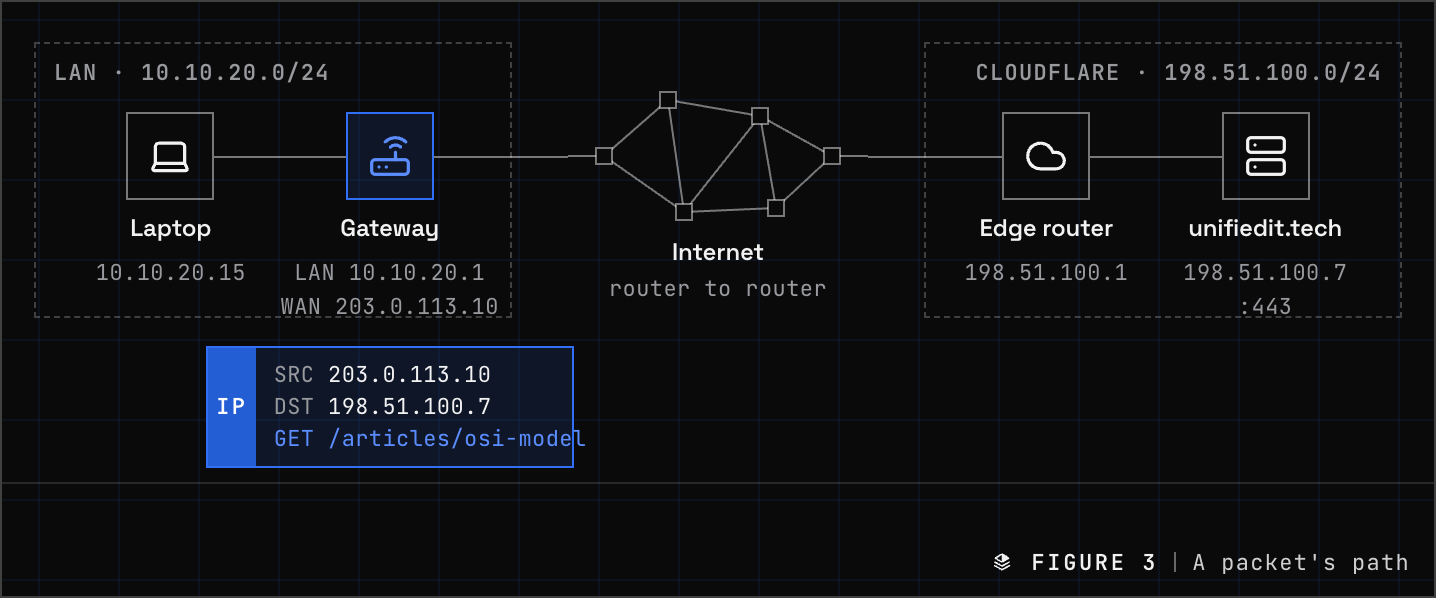
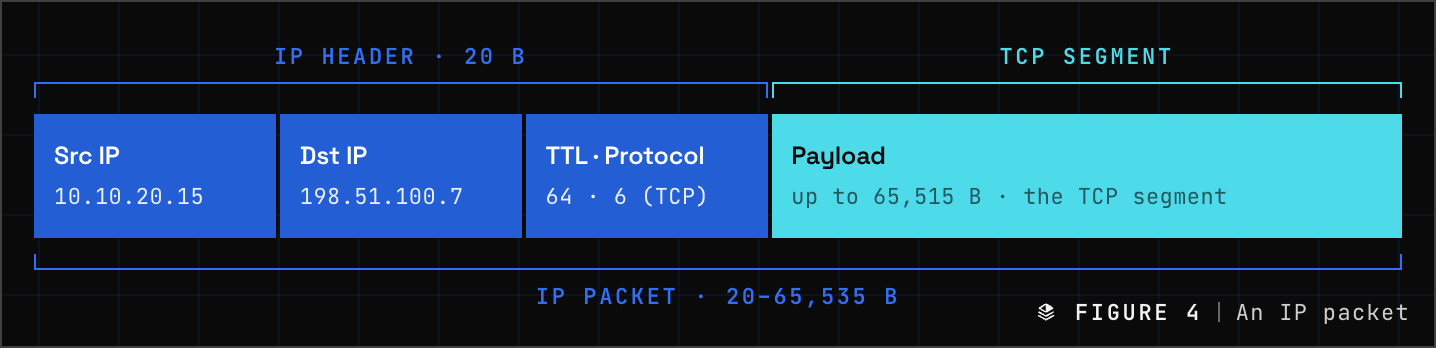
How it fails: a wrong mask or gateway, a route that exists in one direction only, two sites sharing a subnet across a VPN, a tunnel MTU nobody lowered. First check: ping the gateway, then something past it; traceroute to see where the replies stop; read the routing table at both ends, because the far side has to route back.
Layer 4 — Transport
Gets data to the right program on the right host. IP delivers to a machine; transport delivers to a port, which is how one server runs the web on 443 and mail on 587 at the same address. TCP is the careful one: it opens a connection with a handshake, numbers every byte, resends what goes missing and backs off when the path is congested. UDP is the fast one: it sends and does not look back, which is what voice, video and DNS want. QUIC rebuilds TCP's guarantees on top of UDP and carries HTTP/3. Stateful firewalls, NAT and load balancers all decide here, by port. The unit is the segment (TCP) or the datagram (UDP).
- TCPRFC 9293
- UDPRFC 768
- QUICRFC 9000
- Ports0–65535
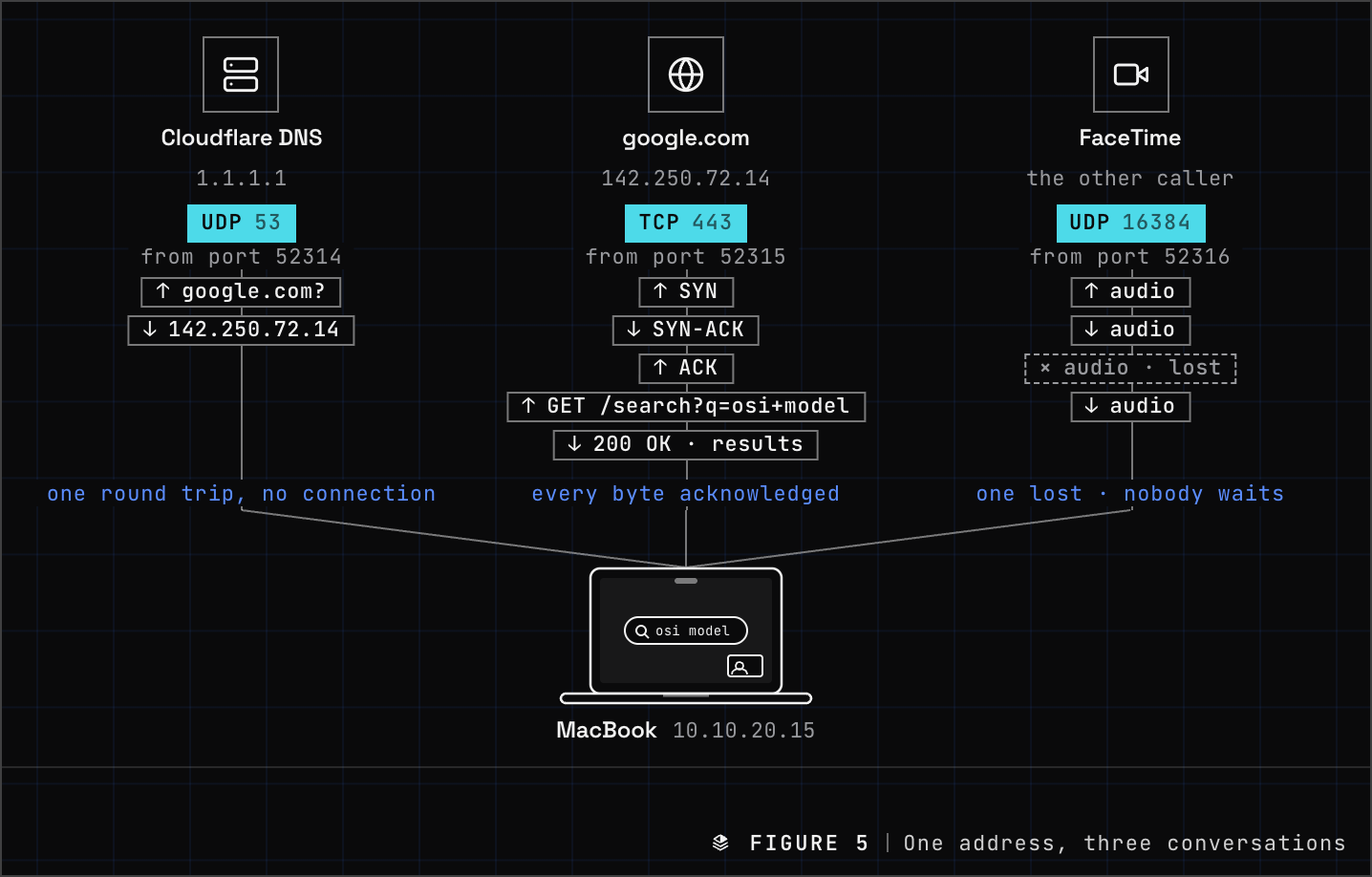
How it fails: a firewall rule on the port, a NAT table that is full, asymmetric routing through a stateful firewall, and packet loss, which TCP hides as slow rather than down. First check: does the port answer at all; then the firewall logs, then the retransmission counters.
nc -zv mail.example.com 587 # does anything answer on the port?ss -tan state established # what is connected right now?Layer 5 — Session
Opens, maintains and closes the dialogue between two applications. On a TCP/IP network this work happens inside the application protocol or a library, which is why the TCP/IP model has no session layer at all. Layers 5 and 6 are thin in practice and matter mostly as vocabulary.
- RPC
- NetBIOS139
- SIP5060 · 5061
- SOCKS1080
- PPTPlegacy
Layer 6 — Presentation
Translates data between the form the application uses and the form that crosses the network: character encoding, serialization, compression and encryption. TLS is most often placed here, though it fits several places (see the questions below). Certificate errors, cipher mismatches and encoding bugs are presentation layer faults.
- TLS 1.3RFC 8446
- UTF-8
- ASN.1
- JSON
- JPEG
- gzip
Layer 7 — Application
The protocols that applications speak. Not the application itself: the browser is not layer 7; HTTP is. Proxies, web application firewalls, DNS filters and firewalls that identify applications work here. The unit is data.
- DNS53
- HTTP80
- HTTPS443
- DHCP67 · 68
- SMTP25 · 587
- IMAP993
- SSH22
- NTP123
- SNMP161
- RDP3389
- SMB445
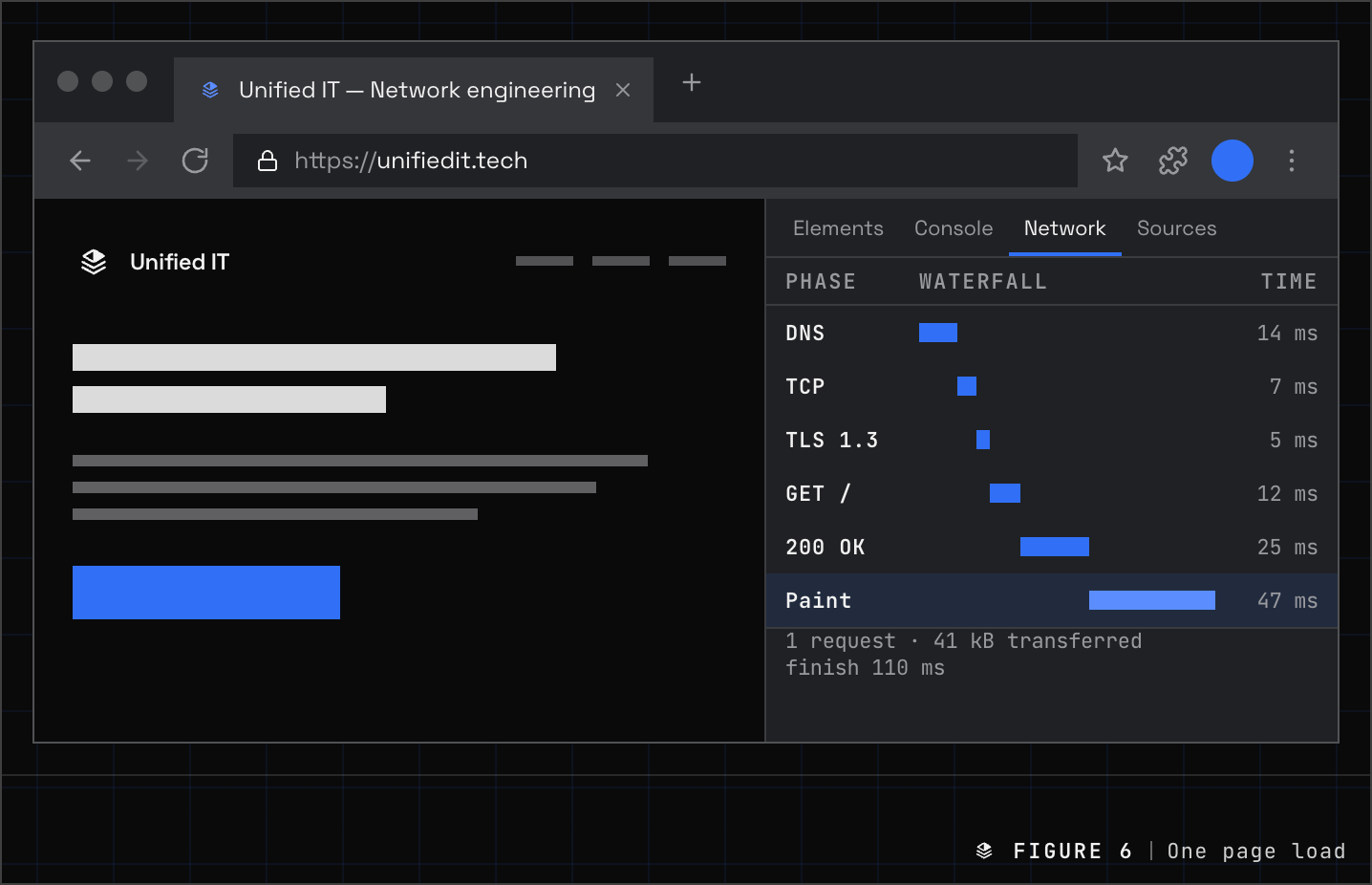
How it fails: DNS. Also an expired certificate, an HTTP 5xx, a proxy nobody documented, a DHCP scope with no leases left. First check: dig, then curl -v, then the server's own logs.
The TCP/IP model
The TCP/IP model, also called the Internet protocol suite, is the four-layer model the internet actually runs on. RFC 1122 (opens in a new tab), Requirements for Internet Hosts, set it down in 1989 with four layers: link, internet, transport and application. TCP/IP had been running on the ARPANET since January 1, 1983; the model describes protocols that existed, not services that ought to.
You will also meet a five-layer version in textbooks, which splits link into physical and data link. Cisco's curriculum teaches the four. Both are fine; say which one you mean.
Link — OSI layers 1 and 2
Everything it takes to move a frame across one physical network: the medium, the MAC addresses, the switches between them. RFC 1122 says little about this layer on purpose. IP was built to run over whatever link is there, and it has: Ethernet, Wi-Fi, fiber, cellular, a tunnel across someone else’s network. ARP lives here, turning a next-hop IP address into a MAC address on the local segment.
- EthernetIEEE 802.3
- Wi-FiIEEE 802.11
- ARPRFC 826
- PPPRFC 1661
Internet — OSI layer 3
IP and its helpers: ICMP for errors and diagnostics, and the routing protocols that fill the tables IP forwards by. Its one promise is to carry a packet from any host to any other host across any number of networks, best effort: no guarantee it arrives, arrives once, or arrives in order. Every layer above is built on that being enough.
- IPv4RFC 791
- IPv6RFC 8200
- ICMPRFC 792
- ICMPv6RFC 4443
Transport — OSI layer 4
End to end between programs, by port. TCP adds the connection, the ordering and the retransmission that IP leaves out; UDP adds only the ports and a checksum; QUIC rebuilds TCP’s guarantees on top of UDP. This is the last layer most of the network reads: stateful firewalls, NAT and load balancers decide by port and look no further.
- TCPRFC 9293
- UDPRFC 768
- QUICRFC 9000
- SCTPRFC 9260
Application — OSI layers 5 to 7
Whatever the program speaks, including the jobs OSI gives to the session and presentation layers. HTTP, DNS, TLS, SSH and SMTP all sit here together. The model has no separate layer for encryption or encoding because the protocols that need them carry their own.
- HTTPRFC 9110
- DNSRFC 1035
- TLS 1.3RFC 8446
- SSHRFC 4253
- SMTPRFC 5321
OSI vs. TCP/IP
The two models disagree in two places. Session and presentation fold into the application because in real protocols that work happens inside HTTP, inside SMTP, or inside a library such as TLS. Physical and data link merge because the suite says nothing about the wire: the same IP packet crosses copper, fiber and radio unchanged.
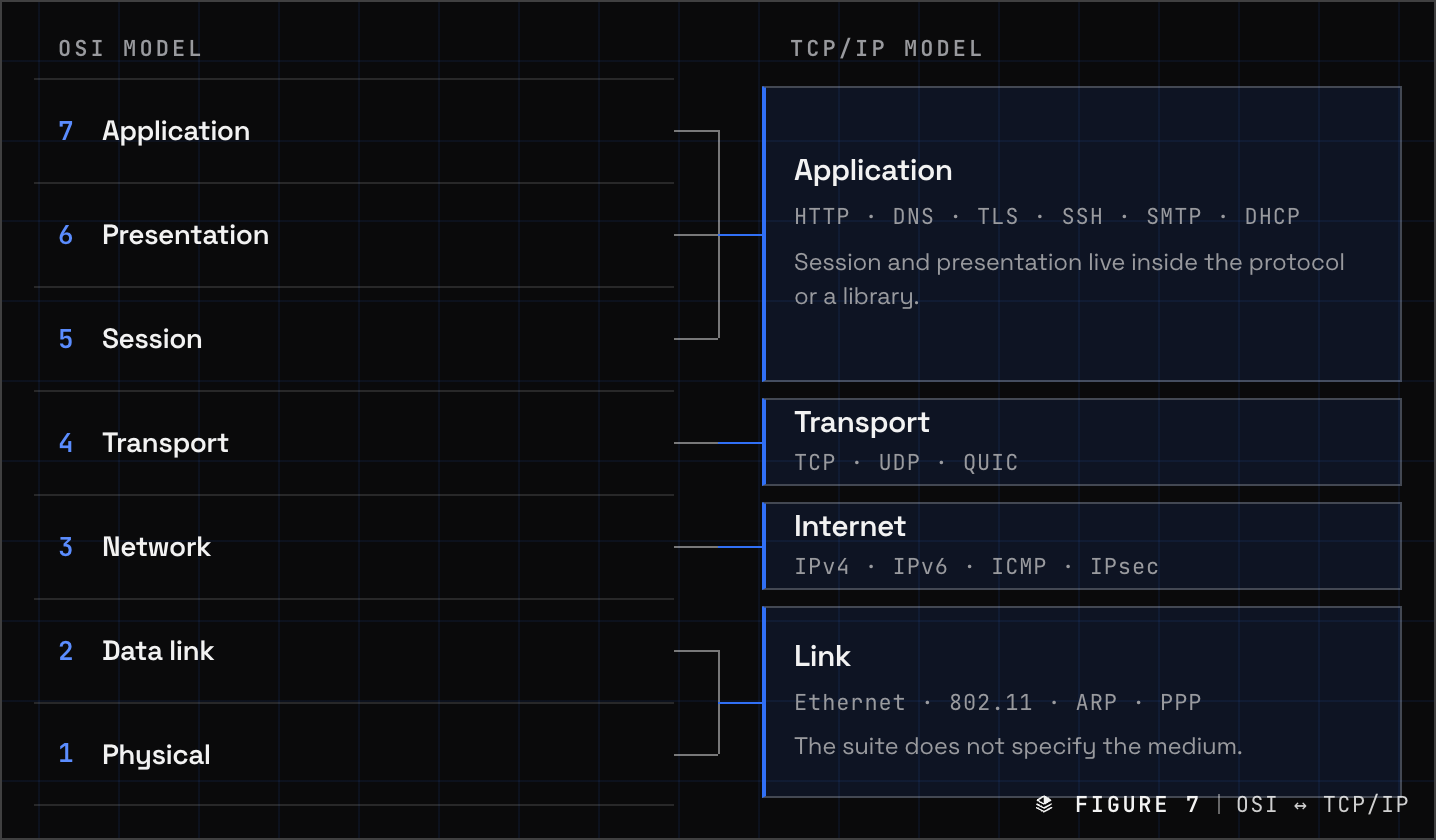
Use both: OSI is the vocabulary, TCP/IP is what runs. When a firewall rule or a job posting says layer 4, it means the OSI number.
| Layer | Unit | Identifier | First check |
|---|---|---|---|
| 7 Application | Data | Hostname, URL | DNS, certificate, server logs |
| 6 Presentation | Data | — | Cipher, certificate, encoding errors |
| 5 Session | Data | — | Timeouts, authentication, RPC binding |
| 4 Transport | Segment, datagram | Port | Port open, firewall logs, retransmits |
| 3 Network | Packet | IP address | Ping the gateway, traceroute, routes, MTU |
| 2 Data link | Frame | MAC address | VLAN on the port, MAC table, STP, ARP |
| 1 Physical | Bits | — | Link light, speed, CRC counters, optic levels |
Which layer is…
The questions that come up most, answered with the OSI number first and the TCP/IP layer second.
- DNS. Layer 7, application. UDP and TCP port 53; DNS over TLS on 853; DNS over HTTPS on 443.
- DHCP. Layer 7, application, on UDP 67 and 68. It discovers a server by broadcast, so it is confined to one VLAN unless a relay forwards it.
- ARP. Between layers 2 and 3; engineers say layer 2.5. It maps an IPv4 address to a MAC address and carries no IP header, so TCP/IP places it in the link layer. IPv6 replaces it with Neighbor Discovery, which runs over ICMPv6 at layer 3.
- TLS. Most often layer 6, presentation; some texts say 5. In TCP/IP it is application. It sits between TCP and HTTP, which is the useful fact.
- ICMP. Layer 3, network. Ping and traceroute.
- VLANs (802.1Q). Layer 2, data link.
- MAC address, layer 2. IP address, layer 3. Port number, layer 4. Hostname and URL, layer 7.
- A switch works at layer 2. A layer 3 switch also routes between VLANs, in hardware. A router works at layer 3. A firewall works at layers 3 and 4 when it is stateful and at layer 7 when it identifies applications. A load balancer works at layer 4 (by port) or layer 7 (by URL or header). An access point works at layers 1 and 2.
- NAT. Layer 3 when it rewrites addresses and layer 4 when it also rewrites ports, which is what every office gateway does.
- QUIC. Layer 4, transport, carried in UDP. HTTP/3 runs on it.
- OSPF and BGP. Routing protocols serve layer 3. OSPF rides directly on IP as protocol 89; BGP rides on TCP port 179. Ask what they do, not what they ride on.
Troubleshooting with the model
Three ways to walk a problem, and one rule that comes first.
- DNS first. Resolve a name, ping an address, ping a name.
- Bottom up when nothing works. Link light, negotiated speed, VLAN on the port, MAC table, IP address and mask, default gateway, ping the gateway, ping past it, port open, application. Each step proves the layer under it.
- Top down when one thing is broken. If other applications work from the same host, layers 1 to 4 are proven. Start at 7: the name, the certificate, the server.
- Divide and conquer when you have no idea. Ping the default gateway. Success proves layers 1 to 3 on your side of it; failure sends you down, not up.
In a UniFi network each layer has a place where it shows itself: port status and negotiated speed for layer 1, the client list and VLAN assignment for layer 2, the gateway's routes for layer 3, the firewall rules and their hit counters for layer 4, and the DNS and application logs for layer 7.
Questions engineers ask
Is the OSI model still used?
As vocabulary, everywhere. No network runs the OSI protocols; every network runs TCP/IP. The seven layer numbers are how engineers, vendors and standards say where a device or a fault sits.
Why does TCP/IP have four layers and OSI seven?
OSI was designed before its protocols existed; TCP/IP was written down after its protocols were running. Session and presentation turned out to live inside applications, and the medium turned out not to matter to IP, so TCP/IP never separated them.
Which OSI layer is DNS?
Layer 7, the application layer. It is also the first thing to check when a network is down.
What is the difference between a frame, a packet and a segment?
The same data at three layers. Segment: the transport unit (TCP; UDP says datagram). Packet: the segment with an IP header. Frame: the packet with an Ethernet header and trailer.
What is a layer 3 switch?
A switch that also routes between VLANs in hardware, so inter-VLAN traffic never leaves for a router. Layers 2 and 3 in one box.
Is TLS layer 6 or layer 7?
Textbooks disagree: most say 6, some say 5, the TCP/IP model says application. All agree where it sits: between TCP and the application protocol.
How we help
When a network is down, our TAC answers with an engineer who walks these layers for a living, and our security audit reads a UniFi configuration layer by layer, from port security to DNS filtering. If you want your own team to think this way, we teach it.
Sources
Every layer, protocol and header in this article is defined in one of the documents below. Where the article and a textbook disagree, the document wins.
ISO · ITU-T1 document
IETF14 documents
- RFC 1122Requirements for Internet Hosts: Communication Layers (opens in a new tab)1989
- RFC 1123Requirements for Internet Hosts: Application and Support (opens in a new tab)1989
- RFC 791Internet Protocol (opens in a new tab)1981
- RFC 8200Internet Protocol, Version 6 (opens in a new tab)2017
- RFC 9293Transmission Control Protocol (opens in a new tab)2022
- RFC 768User Datagram Protocol (opens in a new tab)1980
- RFC 9000QUIC: A UDP-Based Multiplexed and Secure Transport (opens in a new tab)2021
- RFC 1035Domain Names: Implementation and Specification (opens in a new tab)1987
- RFC 7858DNS over TLS (opens in a new tab)2016
- RFC 8484DNS Queries over HTTPS (opens in a new tab)2018
- RFC 2131Dynamic Host Configuration Protocol (opens in a new tab)1997
- RFC 826Address Resolution Protocol (opens in a new tab)1982
- RFC 4861Neighbor Discovery for IPv6 (opens in a new tab)2007
- RFC 8446TLS Protocol Version 1.3 (opens in a new tab)2018
Written by
Cody Franklin
Founder
Cody founded Unified IT in 2019 and has grown it to 400+ completed projects. He leads the company's engineering methodology, client strategy and creative direction, and is training for his pilot's license. Unified IT is a UniFi Certified Partner.
Cody's profile